Link to Pivot Table Creates Absolute Reference

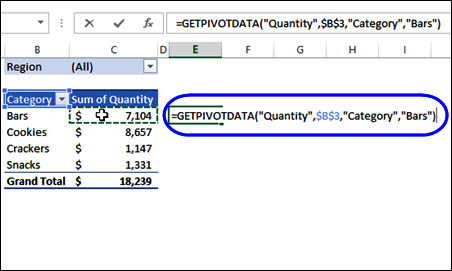
Last week, I did a Pivot Table presentation, and someone asked why you get an absolute reference, if you try to link to a pivot table cell. For example, in the screen shot below, I typed an equal sign in cell E4, then clicked on cell C4, which has the quantity for the Bars category.

That created a GETPIVOTDATA formula, instead of a simple reference to cell C4.
getpivotdata07

Continue reading “Link to Pivot Table Creates Absolute Reference”
Use Sample Pivot Table VBA Code

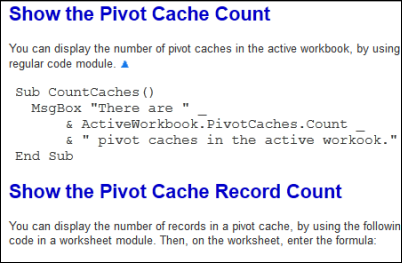
In some of the pivot table articles that I post here, there is sample code that you can use in your own files. Sometimes I show the code sample here, and you can copy and paste it into your workbooks. Other times, I give a link to a file that you can download, and copy the code from that.

If you’re not an Excel programming expert, here are a few tips for copying the Excel VBA programming code to your workbook.

copysamplecode05

Continue reading “Use Sample Pivot Table VBA Code”

Group By Periods in Excel Pivot Table

If you’re working with dates in a pivot table, it’s easy to group them by years, months or days – those are options in the Group By dialog box.

However, sometimes you might need a different type of date grouping. In this example, we’d like to group the sales data into 4-week periods, to match our company’s sales calendar. Keep reading to see the steps to set that up, and make sure the period starts on the correct weekday.

Continue reading “Group By Periods in Excel Pivot Table”

Show Text in Pivot Table Values Area

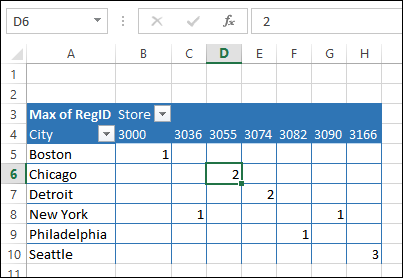
Usually you can only show numbers in a pivot table values area, even if you add a text field there. In the screen shot below, the Max of Region ID is in the Values area.

Instead of the numbers 1, 2 or 3, we’d like to see the name of the region – East, Central or West.

pivot table values show numbers only

Continue reading “Show Text in Pivot Table Values Area”

Format Date Field Subtotals

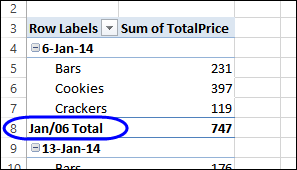
When you show subtotals for a pivot table date field, the dates might not be formatted like the rest of the dates. We’ll take a look at why this happens, and how you can fix it.

For example, in the  screen shot below,

  • the date (in row 4) is formatted as d-mmm-yy
  • the subtotal date (in row 8) is formatted as mmm/yy

subtotaldateformat02

Continue reading “Format Date Field Subtotals”