When you show subtotals for a pivot table date field, the dates might not be formatted like the rest of the dates. We’ll take a look at why this happens, and how you can fix it.
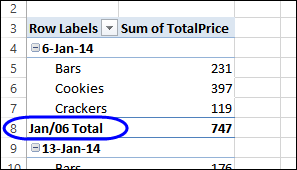
For example, in the screen shot below,
- the date (in row 4) is formatted as d-mmm-yy
- the subtotal date (in row 8) is formatted as mmm/yy