
While working in the pivot table source data, you might add new items. For example, if you start selling a new product, that product will appear in the list of orders. If your pivot table is based on that list of orders, the new product will also appear in the pivot table, when you refresh it.
Sometimes the new items appear at the end of the drop down lists, instead of in alphabetical order. In this list you can see that Paper Clips are at the end, but should follow Paper.
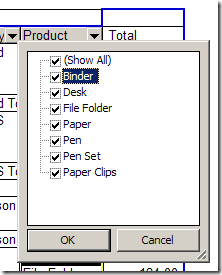
To fix this problem, you can sort the field where the new items appear. In this example the new items are in the Product field, so we’ll sort that field.
Sort the List in Excel 2007
- In the pivot table, click the dropdown arrow for Row Labels.
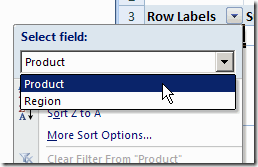
- If there are two or more fields in the Row Labels area, click the drop down arrow at the top of the menu, and select the field that you want to sort. (The Select Field drop down doesn’t appear if only one field is in the Row Labels area)
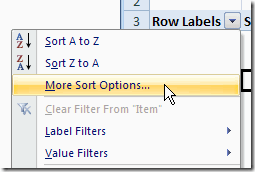
- Click on More Sort Options…
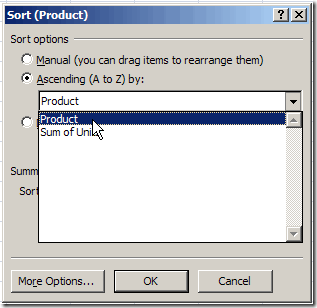
- In the Sort dialog box, under Sort Options, click Ascending (A to Z), and select the field name from the drop down list.
- Click OK, to close the dialog box.
Sort the List in Excel 2003
To fix this problem, you can sort the field where the new items appear. In this example the new items are in the Product field, so we’ll sort that field.
- In the pivot table, right-click on any item in the field that you want to sort.
- In the pop-up menu that appears, click on Field Settings
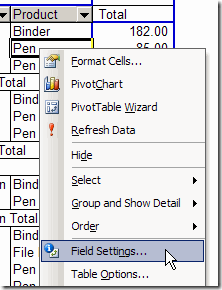
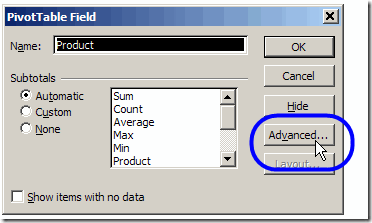
- In the PivotTable Field dialog box, click the Advanced button
- Under AutoSort Options, click Ascending
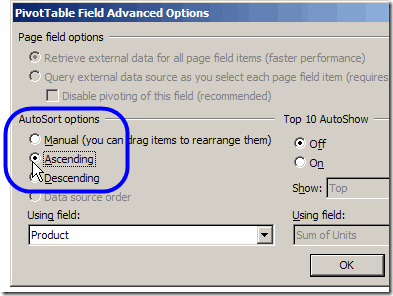
- Click OK, to close the dialog boxes.
_____________________
How does one sort items in the drop down in the Report Filter when new data has been added? I have a Customer field in the Report Filter. My Row labels contain products.
Thanks
Lynn
@ lynn,
I couldn’t find a way either, move the field from “Report Filter” to “Row Label”, then right-click on the new row label and select the desired sort option. Then move the field back to the “Report Filter” area that seems to work OK
@Roger,
Thank you for your input!
How can I avoid having new items on the Scroll down list??
Hi
I am trying to sort the items in a PUll DOwn list that is in the Report FIlter area of my pivot table and I cannot find a Sort function for it. Where would it be?