Show Percent Difference in Pivot Table Amounts

With one of the built-in custom calculations in a pivot table, you can quickly show the percent difference between two amounts. In this example, forecast amounts have been entered for each product, for each month. When they become available, the actual amounts are entered in the workbook.

Continue reading “Show Percent Difference in Pivot Table Amounts”

Grouping Shows Items Before and After Date Range

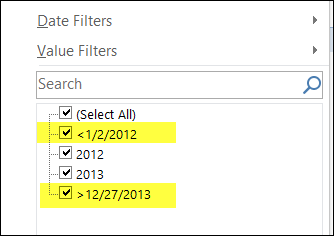
When you group a date field, Excel automatically creates creates groups for all the dates before the start date and after the end date. These items start with a “<” or a “>” symbol, such as “<2012-01-01” and “>2013-12-31”

Usually, you will only see these dates in the filter drop downs.

groupeddatesoutsiderange01

Continue reading “Grouping Shows Items Before and After Date Range”

Change All Number Formats in Pivot Table

Last week, I asked for your input in my survey on pivot table number formats. There were 3 questions in the survey:

  1. Which number format do you use most often in pivot tables?
  2. How many decimal places do you usually set?
  3. If you use Number format, do you usually include the 1000s separator?

Continue reading “Change All Number Formats in Pivot Table”

Prevent Subtotals from Appearing

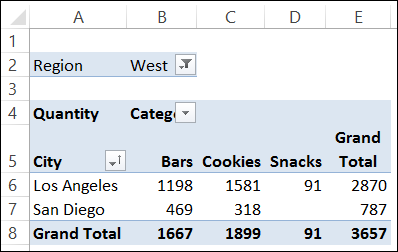
If you add more than one field to the Rows or Columns area in a pivot table, some of the fields automatically get subtotals. In the screen shot below:

  • the City field has a subtotal, because it is an outer field – there is at least one field after it in the layout. Outer fields get subtotals by default.
  • the Category field does not have a subtotal, because it is an inner field – there is no field after it in the layout. The innermost field in the Rows or Columns area doesn’t get a subtotal.

Continue reading “Prevent Subtotals from Appearing”

Changing Pivot Chart Affects Excel Pivot Table

After you create a pivot table, you can insert a pivot chart, based on that pivot table. However, if you change the layout of the pivot chart, it will also change the pivot table’s layout.

For example, if I remove City from the chart in the screen shot below, the City field will also be remove from the pivot table.

Continue reading “Changing Pivot Chart Affects Excel Pivot Table”