Create Calculated Field With a Count

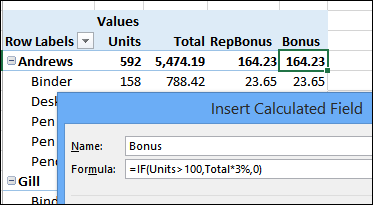
In addition to using fields from the source data, you can create calculated fields in a pivot table, to add your own formulas. For example, add a field that multiplies the total sales by 3%, to show a Bonus amount.

You can learn the basics of Calculated Fields on my Contextures website.

pivotcalculatedfield00

Continue reading “Create Calculated Field With a Count”

Grouping Dates Add Extra Items in Pivot Table Filter

Last week, someone asked me how they could get rid of the extra items that appear in the filter, when you group a date field. Maybe you’ve seen them too – they start with a less than or greater than symbol, and show the first and last dates in your pivot table data.

You can see an example in the screen shot below.

Continue reading “Grouping Dates Add Extra Items in Pivot Table Filter”

Create a Calculated Field in a Pivot Table

One of the top pivot table fears in our survey was “How do you insert a calculated field?” And no wonder it was near the top of the list – pivot table formulas can be very confusing!

So, let’s take a look at calculated fields, and its close companion, the calculated item.

Continue reading “Create a Calculated Field in a Pivot Table”

Pivot Table Training Giveaway Winners

Thanks to everyone who entered the Pivot Table Training giveaway, for a chance to win an amazing online course from John Michaloudis, at My Excel Online Training.

You shared your biggest pivot table fears, and you can see the voting result below. In the upcoming weeks, I’ll cover some of these topics, and all of them are covered in comprehensive John’s online pivot table course.

The winners are listed below, and each person has been sent an email, with instructions for claiming their prize. Winners will have 24 hours to respond, by adding a comment in this blog post, and if they don’t claim the prize, another random name will be selected.

Continue reading “Pivot Table Training Giveaway Winners”

Scary Pivot Table Giveaway Week 2

We’re having a pivot table training giveaway, and there are only a few days left to enter – the deadline is Sunday, November 9th, 2014, at 11:59 PM (Eastern Time)

If you enter, you could win one of the 3 Xtreme Pivot Table Courses ($199 value), thanks to John Michaloudis, from My Excel Online Training. This amazing course has:

  • more than 200 easy-to-follow videos — beginner, intermediate and advanced level
  • practice workbooks
  • finance business cases
  • 12 months of personal support.
  • work through the lessons at your own pace
  • track your progress.

xtreme pivot table giveaway www.pivot-table.com

Continue reading “Scary Pivot Table Giveaway Week 2”

Scary Pivot Table Training Giveaway

Halloween is a couple of days away, and you’ll see many frightening things that night. Keep an eye out for vampires, witches, ghosts and monsters!

Something else that scares some people is a pivot table. Even though it’s a beautiful thing, a pivot table can be scary if you’re not sure how to handle one.

  • Are you afraid to get started with pivot tables?
  • Have you learned the basics, but aren’t sure what to do next?
  • Do the advanced pivot table features make you wake up screaming in the night?

xtreme pivot table giveaway www.pivot-table.com

Continue reading “Scary Pivot Table Training Giveaway”

Show Running Total in Excel Pivot Table

With a running total in a pivot table, you can see how amounts accumulate over a period of time, or through another field, such as products, or customers.

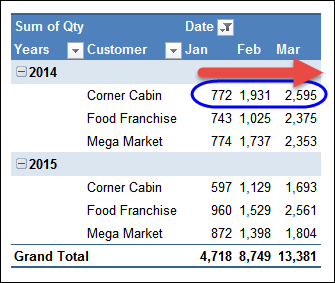
In the screen shot below, the Quantity field shows a running total across the Months column. In March, the Year To Date total for Corner Cabin is 2595.

Show Running Total in Excel Pivot Table https://www.pivot-table.com/

Continue reading “Show Running Total in Excel Pivot Table”

Automatically Refresh an Excel Pivot Table

It would be nice to automatically refresh an Excel pivot table, whenever its source data changes. Unfortunately, there isn’t a built-in way to make that happen. However, here are 3 ways you can refresh a pivot table, after you make changes to the source data.

Continue reading “Automatically Refresh an Excel Pivot Table”

Excel Meal Planner With Pivot Table

Now that fall is here, you might be back into a routine of weekly meal planning, and Excel is a great tool to use for that.

To help you get started, there is a weekly meal planner on my Contextures website, that you can download. Enter the meal and product information, based on your favourite meals.

Then, pick your meals for the upcoming week, and click a button  to create a weekly shopping list.

Continue reading “Excel Meal Planner With Pivot Table”