
In Excel 2003, if you protect a worksheet, you’ll see a list of options, with specific items that can be allowed.
You can add a checkmark to “Use PivotTable reports”, so that people will be able to use the existing pivot tables on the worksheet.
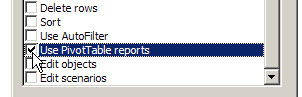
However, once the sheet is protected, you can’t create a new pivot table. Also, you won’t be able to refresh a pivot table on the worksheet, because that feature is disabled on a protected sheet. On the PivotTable toolbar, you can see that the Refresh button, and other features, are disabled.
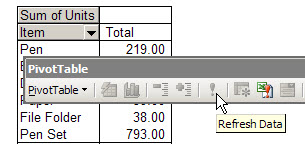
Refresh the Pivot Table on a Protected Sheet
To refresh the pivot table on a protected worksheet,
- temporarily unprotect the worksheet,
- refresh the pivot table,
- protect the sheet.
You can do this manually, or record a macro, then run that macro to refresh the pivot table.
More Protection Tips
There are more pivot table protection tips on my Contextures website.
___________________________
Hi,
I’m using the below mentioned macro to refresh all the pivot tables in a worksheet. The macro is running successfully in unprotected sheet, but I need to run it in protected sheet by using a shortcut key. Please suggest
Sub AllWorksheetPivots()
Dim pt As PivotTable
For Each pt In ActiveSheet.PivotTables
pt.RefreshTable
Next pt
End Sub
Ms. Debra;
You are the Pivot Table Queen!!!!!!, great material, I love your work and kindness that you put in each answer of yours.
Just used this code for refresing my PT
Private Sub Worksheet_Activate()
Dim pt As PivotTable
Me.Protect Password:=”Secret”, UserInterfaceOnly:=True
For Each pt In Me.PivotTables
pt.RefreshTable
Next pt
End Sub
It refreshed my PT succesfully, but I cannot use the expand and collapse buttons, anylonger; any assistance to fix this will be appriacated.