

Thanks to everyone who entered the Pivot Table Training giveaway, for a chance to win an amazing online course from John Michaloudis, at My Excel Online Training.
You shared your biggest pivot table fears, and you can see the voting result below. In the upcoming weeks, I’ll cover some of these topics, and all of them are covered in comprehensive John’s online pivot table course.
The winners are listed below, and each person has been sent an email, with instructions for claiming their prize. Winners will have 24 hours to respond, by adding a comment in this blog post, and if they don’t claim the prize, another random name will be selected.
Xtreme Pivot Table Discount
There is good news, even if you didn’t win – John will give you a 25% discount on his Xtreme Pivot Tables course, if you use the coupon code CONTEXTURES, until Friday, November 21, 2014.
The Giveaway Winners – Online Course
John had a random draw, from all the valid entries, and congratulations to the following 3 people, who each win one of the Xtreme Pivot Table Courses ($199 value). Please reply in the comments below, to confirm that you’re a winner, and John will be in touch.
- lloyd dsouza (confirmed)
- dgrous06 (confirmed)
- UPDATED Nov. 13, 2014 11:15 AM — shabbahm (confirmed)
The Giveaway Runners-Up – Contextures Product
John had another random draw, from all the valid entries, and congratulations to the following 2 people, who each win any one of my Contextures products, such as my PivotPower Premium add-in. (up to $30 value). Please reply in the comments below, and let me know which product you would like
- UPDATED Nov. 13, 2014 11:15 AM — fbanabi (confirmed)
- julia gibson (confirmed)
Pivot Table Fears Voting Results
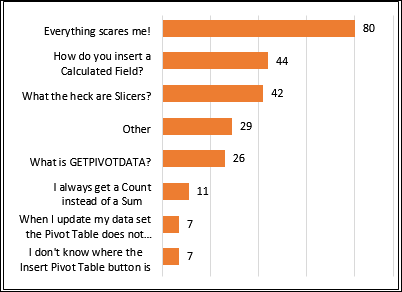
Here are the voting results, from all the valid entries. Of course, I summarized the votes into a pivot table, and you can see the top responses in the pivot chart below.
Surprisingly, the top response was, “Everything scares me!”, with almost twice as many votes as the next response (“How do you insert a Calculated Field?”).
I’ll be covering these topics in upcoming weeks, to help you get over some of those pivot table fears.
Pivot Table Intro
In the meantime, here is John’s video that shows how to insert a pivot table – it’s from one of the first lessons in the Xtreme Pivot Tables course.
And remember, you can get a 25% discount on John’s My Excel Online Training course, if you use the coupon code CONTEXTURES, until Friday, November 21, 2014.
__________________
___________________________
It appears my user name is listed as one of the three winners of the Pivot Table Training Giveaway. Usually don’t win anything, so a little stocked if it is so. Just wanting to confirm if I was lucky this time around. Thanks very much.
Yes Dave, your email address was picked as one of the winners, so congratulations!
John will contact you with the registration details.
Thank you very much for selecting me as a winner for the Xtreme Pivot Table Course!
I use excel on a daily basis as a Business Analyst and participation in this course will be invaluable to me. I am looking forward to this.
You’re welcome, Lloyd, and congratulations!
John will contact you with the registration details.
thanks, I never win either and am not sure what I won 🙂
Congratulations, Julia! As a runner-up, you can have any one of my Contextures products, that are described on this page:
http://www.contextures.com/contexturesproducts.html#contextures
If you use pivot tables frequently, you might like my PivotPower add-in — it stores your preferred settings, and makes it easier to do things like formatting several number fields at once.
http://www.contextures.com/xlPivotPremAddIn.html
Just let me know, and I will send you a download link for the product that you’d like
hope I win!!! need to add power to my pivot tables
Do you know Debra, I can’t believe if I have won anything after loosing everything in my life!
After loosing both my mobility and self-assurance due to MS, surely and highly I gratitude Scary Pivot Tables Giveaway gift.
I use it as the most efficient anti-depressant pill ever prescribed or taken by me.
What can I say more than “Thank You Debra”
Congratulations, Farzaneh! I’m glad the gift has brightened your day, and just let me know which product you would like, from the list here:
http://www.contextures.com/contexturesproducts.html#contextures
I just open my mail and found out I have been selected. Can’t believe it, I have won something.
I use excel everyday in my job to evaluate staff performance. Currently there are big changes happening in our organisation and I have been asked to produce a lots of analysis. Very excited! I am sure this course will take my Pivot table knowledge to next level.
Congratulations, Shab! John will be in touch, to help you register for the pivot table training.