
In recent blog posts, we’ve looked at the pivot table Count function and the Average function. Now we’ll look at two more functions, that are closely related — Min and Max.
Max Summary Function
The Max summary function shows the maximum value from the underlying values in the Values area. The result is the same as using the MAX function on the worksheet to calculate the maximum of the values.
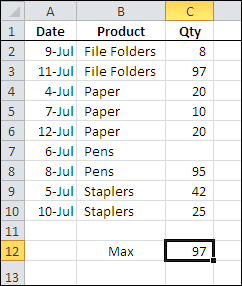
In the screen shot below, you can see the source data for a small pivot table, and the maximum quantity, using the worksheet’s MAX function, is 97.
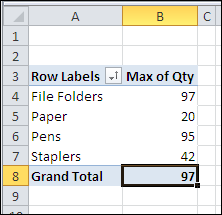
With a pivot table, you can quickly see the maximum for each product that was sold, and the grand total — 97 — which matches the worksheet maximum.
Min Summary Function
The Min summary function shows the minimum value from the underlying values in the Values area. The result is the same as using the MIN function on the worksheet to calculate the minimum of the values.
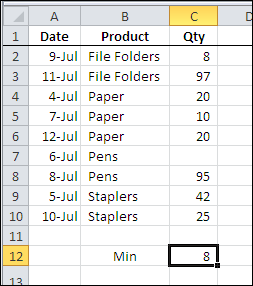
In the screen shot below, you can see the source data for a small pivot table, and the minimum quantity, using the worksheet’s MIN function, is 8.
With a pivot table, you can quickly see the minimum for each product that was sold, and the grand total — 8 — which matches the worksheet minimum.
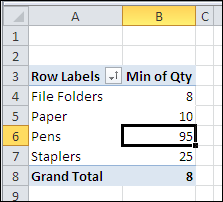
In both the worksheet and the pivot table, the blank cell is ignored when calculating the minimum amount.
___________
___________
Hi Debra. Maybe you can help me with this.
I’m using both MAX and MIN functions in a pivot table to know the older and newest dates for a given row field, and they work fine. The problem is that I want to know the diference between MAX and MIN, but I can’t do it.
I’m trying with a calculated fiel with this formula:
=MAX(Date) – MIN(Date), but it don’t seems to work.
So, if I use both MAX and MIN, how can I get the diference between both of them?
Thanks in advance!
Leonel, a pivot table calculated field will always work on the sum of the underlying values, even if you’re summarizing by another function, like MIN or MAX. You could use a formula outside the pivot table to calculate the difference.
Hello, I need help extracting transactions based on most recent date of occurrence. Here is a sample data.
User Action Date
—– —— ——–
AAA A 8122010
AAA A 8012010
AAA A 6152010
AAA B 7012010
AAA B 6142010
AAA B 6012010
BBB A 8122010
BBB A 8012010
BBB A 6152010
BBB B 7012010
BBB B 6142010
BBB B 6012010
As you can see user AAA performed an action A on 08/12/2010 which is the most recent activity for this user. User AAA performed action B , the latest was on 07/01/2010. How do I extract rows with the most recent date for the user-activity combination? The output I am expecting is records for each category with the most recent date 8122010. I am using Excel 2003 and tried using subtotls custom MAX. But it doesnt seem to work. Will appreciate your help
Max, if you put User and Action fields in the Row area, and Date in the Data area (as Max of Date) you should get the correct result.
If that doesn’t work for you, what result do you see when you try it?
Debra. Your suggestion worked! Thank you soo much. You cant imagine how much time I saved.. Thanks again!
Hi there,
I’m doing a very basic pivot table and know how to do Min and Max one at a time, but am trying to get them side by side so I can see both the Min and the Max at once. is there a way to do this?
Thanks in advance.
Cheers,
Jen
Jen, in the pivot table field list, drag two copies of the field into the Values area, and make one Min and the other Max.
Is there a way to display the second and third highest / lowest totals as well as just the max and min? In a similar fashion to the SMALL or LARGE functions in a worksheet?
For example, in the first screenshot the second highest value is 95, is there a way to show this in a pivot table? And the third largest value in a separate column, and so on?