
Usually, things go smoothly when you when you try to create a pivot table. However, occasionally you might see a pivot table error, Excel Field Names not Valid, if you try to build a new pivot table, or refresh an existing pivot table.
Updated Jan. 1, 2019 – macro to help with troubleshooting the pivot table error
Pivot Table Data
In the screen shot shown below, there’s a list of sales orders, and we’d like to create a pivot table from that data.
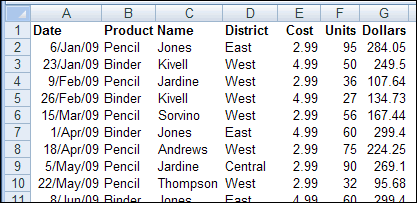
Everything looks okay in the source data, but when you try to insert a pivot table, a confusing (and very wide!) error message appears:
“The PivotTable field name is not valid. To create a PivotTable report, you must use data that is organized as a list with labeled columns. If you are changing the name of a PivotTable field, you must type a new name for the field.”

The message is confusing because the source data is in a list with labeled columns, and you aren’t trying to change the name of any fields.
Fix the Field Name Problem
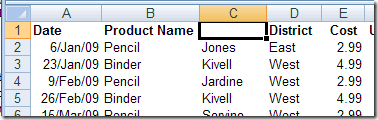
This error message usually appears because one or more of the heading cells in the source data is blank. To create a pivot table, you need a heading for each column.
Tip: If you create an Excel Table from your data, column headings are automatically added to columns with blank heading cells, and you can avoid this error.
To find the problem, try these steps:
- In the Create PivotTable dialog box, check the Table/Range selection to make sure you haven’t selected blank columns beside the data table.
- Check for hidden columns in the source data range, and add headings if they’re missing.
- If there are any merged cells in the heading row, unmerge them, and add a heading in each separate cell.
- Select each heading cell and check its contents in the formula bar; text from one heading may overlap a blank cell beside it. In this example, the Product Name heading overlapped the empty heading cell beside it.
- If there are no blank heading cells, and you are using Excel 2003 or earlier, check for long headings – there is a limit of 255 characters in those versions
Existing Pivot Table
The “field name is not valid” error message can also appear if you try to refresh an existing pivot table, or if you click the Refresh All command in an Excel workbook.
In some cases, you might not know which pivot table is causing the problem, because the pivot table error does not show the name.
Troubleshooting With a Macro
To help identify the problem pivot table, use the “List All Pivot Table – Headings” macro from my Contextures website. Copy the code from that page, and paste it into a regular code module, then run the macro.
The macro lists each pivot table in the file, with the following information:
- Worksheet name
- Pivot Table name
- Pivot Cache index number
- Source Data name or range address
Also, if the source data is a list in the same Excel workbook, it shows details about the source data:
- Number of records
- Number of columns
- Number of heading cells that contain values
- Fix — an X if number of columns does not match number of headings
- Latest refresh date for the pivot cache

More Pivot Table Errors
Problem: Pivot Table Duplicate Items
_________________
Hi Sir, can I remove or replace the “(blank)” word in the following example?
Forecast item DESC Combo Qty per pack Sum of Qty Sold (Sales History)
11-065-00-01-01-001 611006 Cloth (blank) 1 872
11-065-00-01-01-002 611006 Cloth ( 1 x 10) (blank) 1 1,110
11-065-00-01-01-001 Total 1,982
Besides, I would like to copy value & layout of a finished pivot table to another worksheet, but I try several time I can’t copy the format. Please advise how to do that.
Thanks a lot!
Dennis, there are instructions here for changing the (blank) labels.
You can use the Office Clipboard to paste the pivot table formatting.
Thanks for this. I realized even though I wasn’t seeing ‘blanks’ I had some hidden columns that excel was seeing and they had blanks in them. GGRrrrr
Nicole, you’re welcome. Glad you were able to solve the problem by finding those hidden columns.
It worked.
THANK YOU!!! I had a hidden column I didn’t even realize was there. This helped!
Thanks, I didn’t realize that I have blank heading ^^
It’s work ^_____^
Due to my (painful) experience, I may also tell you that a too long text for the column label may be the cause of this error message.
Thanks Tim, and the heading length is 255 characters in Excel 2003. In Excel 2007, that limit seems to be removed, or much higher.