Starting Each Pivot Item on a New Page

Normally, a long pivot table prints to the bottom of a page, then continues on the next page. The page break occurs naturally, not at a specific position in the pivot table.

You can control the page breaks, by changing the pivot table settings.

The Sample Layout

In this example, the pivot table has two fields in the Row Labels area – Store and Product Category.
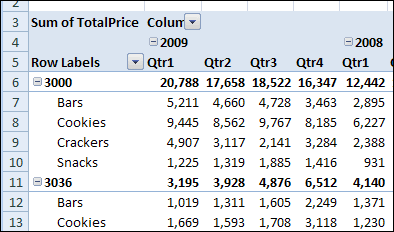
pivotitempage01

We’d like to print this pivot table, with each store’s data starting on a new page. That way, we’d be able to print the entire
report, and send each store its own section.

Change the Field Setting

We’ll change a setting in the Store field, so each pivot item starts on a new page in the printed report.

  1. Right-click one of the Store labels in the pivot table, and then click Field Settings.
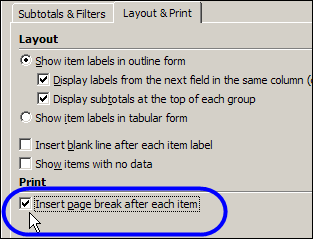
  2. In the Field Settings dialog box, on the Layout & Print tab, add a check mark to Insert Page Break After Each Item.
  3. Click OK, to close the dialog box.

PivotItemPage02

Things to Consider

The Insert Page Break After Each Item setting doesn’t force all items for a field fit on one page. It only creates a page break so the next item will start on a new page. If a field has many items, it might print on two or more pages.

Also, with this setting, your printed report could use an excessive amount of paper. You might prefer to manually adjust the page breaks in Page Break Preview.

To Go To Page Break Preview

  1. On the Ribbon’s View tab, in the Workbook Views group, click Page Break Preview.
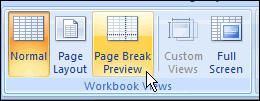
    RibbonPageBreak

  2. Dashed lines indicate an automatic page break and solid lines are manual page breaks.
  3. To move a page break, point to it, and drag up or down on the page.

To return to Normal view

  1. On the Ribbon’s View tab, in the Workbook Views group, click Page Break Preview.

_____________
Pivot Table Defaults to Sum or Count

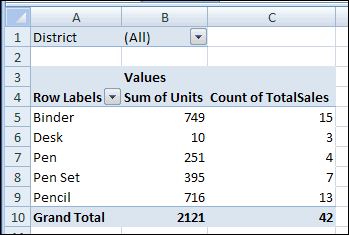
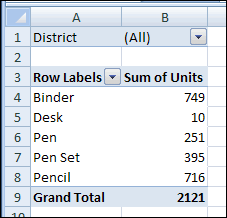
When you add a numeric field to the Values area of a pivot table, it usually appears as a Sum. For example, in the pivot table shown below, the Units field became Sum of Units.

ValueSum

Occasionally, when you add a numeric field to the Values area, it shows the Count, instead of the Sum. In the same pivot table, when the TotalSales field is added, it shows a Count.

ValueCount

Pivot Table Default Function

If you add a number field to the Values area, the default summary function is Sum. However, if the source data has blank cells, or nonnumeric data, such as text or errors, in that field, the Count function is the default summary function.

You can’t change the default settings for the data fields, but you can manually change the summary function after you add the fields to the Values area.

To manually change the summary function:

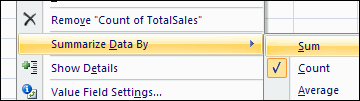
  1. Right-click a cell in the field you want to change, and click Summarize Data By.
  2. Click the summary function that you want to use.

SummarizeDataBy

Pivot Table Add-in

There’s a feature that changes all the data fields to SUM, or any other summary function, in my pivot table add-in. It add a new tab to the Ribbon, with time-saving commands that you can use.

  1. After you install the add-in, select any cell in the pivot table.
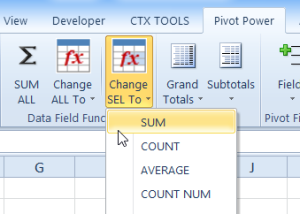
  2. Then, on the Ribbon’s Pivot Power tab, click SUM ALL.
  3. Or, click Change ALL to, then click the Summary function that you want to use.

sumselectedvalues

______________

For more information on Pivot Tables, please see the Pivot Table Tutorials on the Contextures Website.

_________________

New Pivot Items Out of Order

If you add new products to your pivot table source data, and refresh the pivot table, the new products will appear in the drop down lists. Sometimes though, the new items appear at the end of the list, instead of in alphabetical order. This problem can occur if you have manually rearranged the items in the Row Labels area.

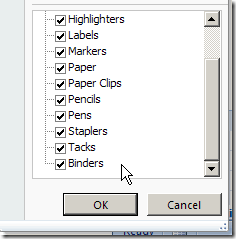
For example, binders were just added to this pivot table’s source data. When the pivot table was refreshed, Binders appeared at the bottom of the Product list, instead of the top.

ListManualSort

Because it’s not in alphabetical order, it’s difficult to find the new product in the list. You’d like the product list sorted alphabetically.

Sort the List

If a field is set for Manual sort, new items will appear at the end of the drop-down list. Follow these steps to sort the field in ascending order:

  1. Right-click a cell in the Product field. For example, right-click the Envelopes cell.
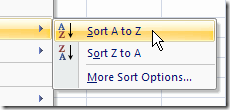
  2. Click Sort, and then click Sort A to Z.

SortAZ

When you sort the Product field, its sort setting changes from Manual to Sort Ascending or Sort Descending. This also sorts the drop-down list, and makes it easier for users to find the items they need.

______________

For more information on Pivot Tables, please see the Pivot Table Tutorials on the Contextures Website. _________________

Re-create Pivot Table Source Data Table

If you accidentally delete the Excel 2003 worksheet that has the source data for your pivot table, you may be able to use the pivot table’s Drill to Details feature to re-create it.

Extract the Pivot Table Data

To re-create the source data in Excel 2003, follow these steps to use the Drill to Details feature:

  1. Make sure that none of the items in the pivot table fields are hidden. For page fields, (All) should be selected. For row and column fields, (Show All) should be checked. Note: You don’t need to include all the fields in the pivot table before using the Drill to Details feature.
  2. Show the grand totals for rows and columns. If they aren’t visible, right-click a cell in the pivot table, and click Table Options. Check the options Grand totals for rows and Grand totals for columns, then click OK.
  3. Double-click the grand total cell at the bottom right of the pivot table. This should create a new sheet with the related records from the original source data.

Fix the Extracted Data

If the original source data contained formulas, you will have to re-create them, because the Drill to Details feature exports the data only.

The columns in the extracted data will be in the same order as they were in the original source data.

The extracted data will be formatted with Table AutoFormat List 3. You can apply a different AutoFormat, or apply your own formatting.

Note: If you had made changes to the source data and not updated the pivot table, those changes won’t be in the extracted data.

Connect to the Extracted Data

If you rename the sheet that was created during the Drill to Details process, and use the same name as the worksheet that originally held the source data, the pivot table might automatically connect to the new source data table.

If not, you can connect to the re-created source data:

  1. Right-click a cell in the pivot table, and choose PivotTable Wizard.
  2. Click the Back button, and select the new source data table range.
  3. Click Finish.