
In your source data, you might record the amount of time that employees have spent working on projects. For example, Jim worked on Project A for 8 hours Monday, 8 hours Tuesday, 6 hours Wednesday and 3 hours Thursday, for a total of 25 hours.
In the pivot table, you want the total time per project, and Project A should show a total of 25 hours.
However, your pivot table shows 1:00 as the total, instead of 25:00.
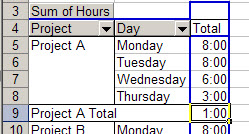
This happens because the results are shown as time rather than total time. The first 24 hours are counted as one day, and the remaining hour is 1:00 AM of the second day. The 1:00 in the Project A Total represents the 1:00 AM time.
To see the total time, format the cells that contain total times with the custom number format [h]:mm, and they’ll total correctly.
To apply the custom format
- In the pivot table, right-click on the Sum of Hours field button
- Click on Field Settings
- Click the Number button
- In the Category list, click on Custom
- In the Type box, enter: [h]:mm
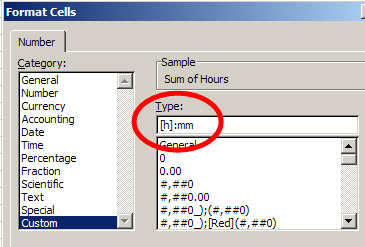
- Click OK, twice, to close the dialog boxes.
- The pivot table will now show the total time for hours worked on each project.
___________________________
For more information on pivot tables, see the PivotTable Topics on my Contextures web site.
I also have the same trouble as Daniel, anyone have a resolution for this?
Hello everyone. The [h]:mm:ss is a CONVERSION that converts a “decimal part of day” (with 1.0 being 24:00:00 or 1 day), so the field that you “format” using the [h]:mm:ss (or just [h]:mm) converts the filed using the following logic:
for [h]:mm -> number minutes in a day ( 24 * 60 = 1440 ) -> 1440 = 1
for [h]:mm:ss -> number of seconds in a day ( 1440 *60 = 86400 ) -> 86400 = 1
So, you have to change the “number of minutes or seconds” to a “Decimal part of Day” by dividing your Minutes or Seconds by the TOTAL shown above. This will always return the correct Hours:Minutes:Seconds if you do so.
Hope this helps explain the “[h]” format function. I have used it successfully for many years this way. Although I have a minor glitch when using a “Pivot Table Calculated Field” using a Formula to return the Total Hours in a Year using this “Leap Year” formula that I ran across (and formatting it with the [h] {duration} format):
=IF(((MOD(YEAR,4)=0)*((MOD(YEAR,100)0)+(MOD(YEAR,400)=0))=1),366,365)
I think this formula is incorrect when using a calculated field for the year. I have checked the data when it calculates incorrectly and all the year fields are the correct value. I am looking for a better “Number of days in a year” formula.