
If you have multiple pivot tables and lists in an Excel file, you might need to identify which data source each pivot table uses. This macro will list all pivot tables, with source , or MDX, for OLAP-based pivot tables.
List All Pivot Tables Macro
The following code checks for at least one pivot table in the workbook. If there aren’t any pivot tables, the macro stops.
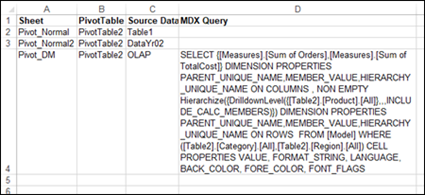
If there’s at least one pivot table, the macro adds a new worksheet to the workbook, with a list of all pivot tables, the sheet name where they’re located, and their data source (non-OLAP), or MDX query (OLAP-based, such as pivot tables added to the Data Model).
NOTE: If you want manually locate and change the source data, go to the pivot table source data page.:
How to Use the Macro
Add this code to a regular code module in your workbook, and to run the code, follow these steps
- On the Excel Ribbon, click the View tab
- At the far right, click Macros
- Select this macro in the list, and click the Run button
Macro – List All Pivot Tables
Here is the code for the macro to list all pivot tables with source of MDX information.
Sub PivotSourceListAllWithMDX()
Dim wb As Workbook
Dim ws As Worksheet
Dim wsList As Worksheet
Dim pt As PivotTable
Dim lPT As Long
Dim strMDX As String
Dim strSource As String
Dim wMax As Long
Dim wsPT As Worksheet
Dim PTCount As Long

On Error Resume Next

Set wb = ActiveWorkbook

For Each wsPT In wb.Sheets
  If wsPT.PivotTables.Count Then
    PTCount = PTCount + 1
  End If
  If PTCount > 0 Then Exit For
Next wsPT

If PTCount = 0 Then
  MsgBox "No pivot tables in this workbook"
  Exit Sub
End If
Set wsList = Worksheets.Add
With wsList
  .Range(.Cells(1, 1), .Cells(1, 4)).Value _
      = Array("Sheet", "PivotTable", _
          "Source Data", "MDX Query")
End With
lPT = 2
wMax = 50

For Each ws In wb.Worksheets
  For Each pt In ws.PivotTables
   If pt.PivotCache.OLAP = False Then
      strSource = pt.SourceData
      strMDX = ""
    Else
      strSource = "OLAP"
      strMDX = pt.MDX
    End If

    With wsList
      .Range(.Cells(lPT, 1), _
        .Cells(lPT, 4)).Value _
          = Array(ws.Name, pt.Name, _
            strSource, strMDX)
    End With
    lPT = lPT + 1
  Next pt
Next ws

With wsList
  .Columns("A:D").EntireColumn.AutoFit
  .Columns("A:D").VerticalAlignment = xlTop
  .Rows(1).Font.Bold = True
  With .Columns(4)
    If .ColumnWidth > wMax Then
      .ColumnWidth = wMax
    End If
    .WrapText = True
  End With
End With


End Sub
More Pivot Table Source Data Macros
There are more pivot table source data macros on my Contextures website. You can also download an Excel workbook with sample pivot tables, and the macros, to test them.
You can also get details on how to Fix Pivot Table Source Data, and a macro to quickly unpivot Excel data, so it’s ready to use for a pivot table.
______________________
List All Pivot Tables with Source or MDX
______________________