
A common problem in an Excel pivot table is that new items are added at the end of a drop down list. For example, in the following list, the Paper Clips item is at the end of the list, instead of appearing in alphabetical order.
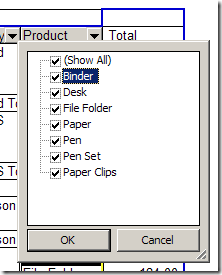
This problem can be solved by sorting the field as described in my previous article – New Items at End of Pivot Table Drop Down Lists.
Error Message For Hidden Items
Usually, sorting the list quickly solves the problem, but I recently had an email from Martin tePoele, who had received an error message while trying to sort a field in his pivot table.
The message said: “Too many items are hidden. Unhide some items to continue.”
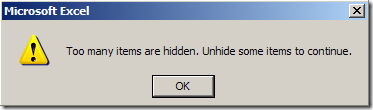
The field that Martin was trying to sort had over a thousand items, and only about 40 were selected. All the rest were hidden.
Limits in Excel 2003
I did some testing in Excel 2003, and discovered that 512 items seems to be the limit. If more than 512 items are hidden, you’ll get the error message when you try to manually sort the field.
However, I was able to programmatically sort the field, with 1000+ items hidden, without any problems. You could try this if you have more that 512 items hidden, and you don’t want to unhide them in order to sort the pivot field.
For example, the following code will sort all the pivot fields in ascending order.
‘==========================
Sub PivotSort()
Dim pt As PivotTable
Dim pf As PivotField
Set pt = ActiveSheet.PivotTables(1)

    For Each pf In pt.PivotFields
        pf.AutoSort xlAscending, pf.Name
    Next pf

End Sub
‘==========================
Hidden Items in Excel 2007
With the increased limits to pivot tables in Excel 2007, the problem seems to be fixed. I was able to hide 1000+ items in a pivot field, and could manually sort the field without getting the error message.
_____________________
I am working with a friend in Excel. I have 2007 and he 2003. When I create pivot tables in 2007 He is not able to refresh these tables in 2003. If the table is craeted in 2003 I am able to work with them in 2007. I always save as a 2003 workbook. But after that the problem occurs again.
How can we solve this?
Marijke, for pivot tables created in Excel 2003, as long as you keep the file in compatibility mode, your friend should be able to refresh the pivot tables in Excel 2003 after you’ve used the file in Excel 2007.
There’s an article on the Microsoft web site that outlines working with different Excel pivot table versions.
I am currently using Excel 2010. I have a number of pivot tables which have hidden items but I would like the totals of each of these hidden items to be included in the grand total. Is this possible? Basically, I have sales numbers for different regions and I do not want the sales managers name listed , along with the sales reps so I hide the managers names but I do want their sales included in the grand total.
In Power Pivot, hiding a column does not remove it from the model. A hidden column can still be used as a sort column in a table. It can also be referenced in formulas that define calculated columns or calculated fields.