Sometimes it’s quicker to use a keyboard shortcut, instead of the mouse, to accomplish a task in Excel. Here are some of the keyboard shortcuts for working with pivot tables in Excel 2007 and Excel 2003.
Excel 2007 Pivot Table Keyboard Shortcuts
Shortcut
Action
Ctrl + Shift + *
Select entire pivot table (not including Report Filters)
Ctrl + A
Select entire pivot table (not including Report Filters)
Spacebar
Add or remove checkmark for selected field in PivotTable Field List
Alt + Shift + Right Arrow
Group selected pivot table items
Alt + Shift + Left Arrow
Ungroup selected pivot table items
Down Arrow
Select next item in PivotTable Field List or Items List
Up Arrow
Select previous item in PivotTable Field List or Items List
End
Select last item in PivotTable Field List or Items List
Home
Select first item in PivotTable Field List or Items List
Alt + Down Arrow
Open field list for active cell
Ctrl + –
Hide selected item or field
Shift + Ctrl + =
When data field selected, opens Calculated Field dialog box
Shift + Ctrl + =
When field heading cell selected, opens Calculated Item dialog box
Alt + D, P
Open the old PivotTable Wizard
Excel 2003 Pivot Table Keyboard Shortcuts
In Pivot Table
Shortcut
Action
Alt + L
Show Pivot Table dialog box
Alt + R
move selected field into Row area
Alt + D
move selected field into Data area
Shift + Right Arrow
Group selected pivot table items
Alt + Shift + Left Arrow
Ungroup selected pivot table items
Down Arrow
Select next item in Items List
Up Arrow
Select previous item in Items List
End
Select last visible item in List
Home
Select first visible item in List
Alt + Down Arrow
Open field list for active cell
Ctrl + –
Hide selected item or field
Shift + Ctrl + =
When data field selected, opens Calculated Field dialog box
Shift + Ctrl + =
When field heading cell selected, opens Calculated Item dialog box
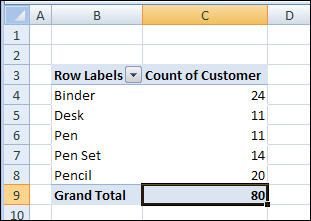
After you create an Excel pivot table, you might want to know how many unique customers placed an order for each product. However, when you add the Customer field to the pivot table’s Value area, it shows the number of orders, not the number of unique customers.
Unfortunately, a pivot table doesn’t have a built-in function to calculate a unique count. As a workaround, you could add a column to the source data, then add that field to the pivot table.
Add a Field to the Source Data
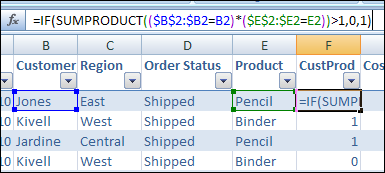
In this example, we want to count the number of unique Customer who ordered each product. We’ll add a column to the pivot table source data, with the heading ‘CustProd’.
In the CustProd column , we’ll enter a formula that refers to the customer (B) and product (E) columns.
With this formula, if the row contains the first instance of a customer/product combination, the result is 1. For subsequent instances, the result is 0.
Add the Field to the Pivot Table
After you create the new field in the source data, copy the formula down to the last row of data.
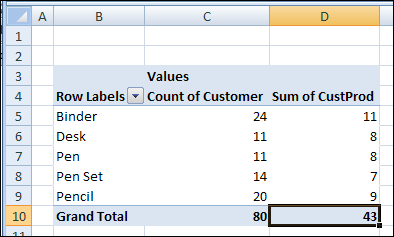
Then add the CustProd field to the pivot table Values area using the Sum function. In the screenshot below, you can see the Sum of CustProd field.
Based on the new CustProd field, we can see that 11 unique customers placed orders for a Binder, and only 7 unique customers ordered a Pen Set.
Video: Show Distinct Count in Excel 2013 With PowerPivot
[Update] To see the steps for setting up the pivot table, and creating the formula, please watch this video.
Video: Count Unique in Excel Pivot Table
[Update]In this short video, I show how to count unique items (distinct count) in a Microsoft Excel pivot table. This method works in Excel 2013 and later versions.
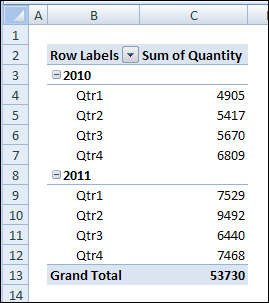
However, the grouping options are based on the calendar year, and there are no options for grouping pivot table dates by fiscal year. If you want to group the dates by your company’s fiscal year, which starts in July, there’s no built-in way to do that.
Pivot Table dates grouped by year and quarter
Fiscal Year Workaround
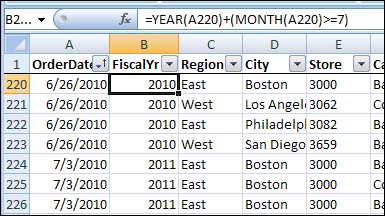
Because there’s no built-in option to group pivot table dates by fiscal year, you’ll have to use a workaround solution. In the pivot table source data, you can add a column with a formula that calculates the fiscal year, and then add that field to the pivot table.
For example, if your fiscal year starts in July, use the following formula to calculate the fiscal year, where the date is in cell A2:
=YEAR(A2)+(MONTH(A2)>=7)
The formula calculates the year of the date in cell A2. Then, it calculates the month of the date in cell A2, and checks to see if the month number is 7 or higher. If the month is less than 7, then zero will be added to the year, otherwise 1 will be added.
In the screenshot below, you can see the fiscal year formula for dates in June and July.
The year for all the dates is 2010.
For the June dates, the month is 6, which is less than 7. So, zero is added to the year, and the fiscal year is 2010.
For the July dates, the month is 7, so 1 is added to the year, and the fiscal year is 2011.
Fiscal Year formula
Fiscal Quarter Workaround
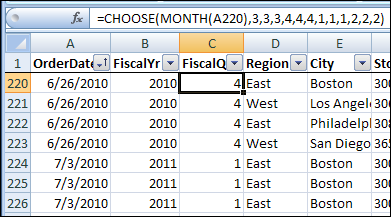
If you also want to group the pivot table dates by the fiscal quarter, you can add another column to the pivot table source data. Use this formula to calculate the fiscal quarter, if the fiscal year starts in July.
=CHOOSE(MONTH(A2),3,3,3,4,4,4,1,1,1,2,2,2)
The Choose formula calculates the month of the date in cell A2. Based on the month number, the formula selects the appropriate fiscal quarter number from the numbers that follow. For example, if the month is June, the month number is 6. In the Choose formula, the sixth number is 4, so June is in fiscal quarter 4.
In the screenshot below, you can see the fiscal quarter formula for dates in June and July.
For the June dates, the month is 6, and the sixth month in the Choose formula is 4, so June is in fiscal quarter 4.
For the July dates, the month is 7, and the seventh month in the Choose formula is 1, so July is in fiscal quarter 1.
fiscal quarter formula for dates in June and July
Add the Fiscal Dates to the Pivot Table
If you had grouped year and quarter dates in the pivot table, ungroup them and remove them.
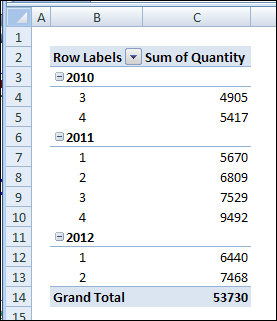
Refresh the pivot table, and add the fiscal year and fiscal quarter fields to the Row Labels area.
fiscal year and fiscal quarter fields in pivot table
Videos: Pivot Table Grouping
Learn more about pivot table grouping, and get a workbook with sample file that you can use for testing. Go to the How to Group Pivot Table Data page on my Contextures website.
First, this video shows how to group Text items in a pivot table.
Next, this short video shows the basics of pivot table grouping
______________
When you add a date field to your Pivot Table, Excel automatically groups the dates into a hierarchy, such as years and months. See how to stop pivot table date grouping in the latest versions of Excel, and a couple of workarounds for Excel 2016. You can also read about why this feature was added, and watch a date grouping video.
Prevent Date Grouping
It’s easy to prevent automatic date grouping for pivot tables in Excel 2019/365, by changing a setting. See the simple steps below.
If you’re using Excel 2019 or Excel for Office 365, there’s good news. You don’t have to use workarounds or make changes to the registry. Now, you can simply change one of the Excel options, to stop pivot table date grouping.
NOTE: This is an application-level setting, not a setting for individual workbooks.
To turn this setting off:
At the top of Excel, click the File tab
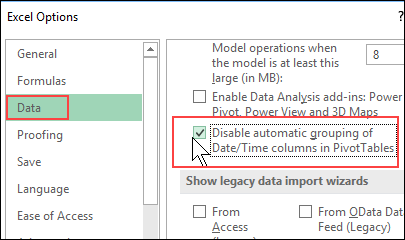
Click Options, then click the Data category
In the “Data options” section, add a check mark to “Disable automatic grouping of Date/Time columns in PivotTables”
Click OK to close Excel Options
Excel 2016 Workaround
In Excel 2016, there isn’t an easy way turn off pivot table date grouping. However, to prevent dates from automatically grouping in Excel 2016, you can use this 2-step workaround:
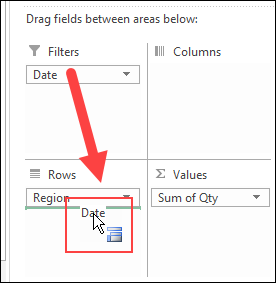
Add the date field to the pivot table Report Filter area first. Dates are not automatically grouped there
Then, in the PivotTable Fields list, drag the date field into the Rows or Columns area. Dates will remain ungrouped.
Excel 2016 Registry
The only way to turn off pivot table date grouping in Excel 2016, if you’re brave enough, is by making a change to the Windows Registry.
Pivot Tables dates weren’t grouped in earlier versions of Excel, but that behaviour changed in Excel 2016. Since that version, dates in Pivot tables have been automatically grouped too.
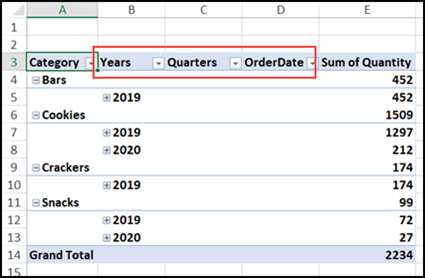
Here’s a pivot table in which I added the Category and OrderDate fields to the Rows area. Because of the date grouping, extra columns were automatically created, to show the Years and Quarters, as well as the Order Date.
Implementing grouping for Data Model PivotTables allows for grouping to be used in conjunction with the power of the xVelocity engine and is a key feature for making Data Model PivotTables a replacement for native ones in the future. When used in a data model PivotTable, Time grouping adds relevant Date/Time columns such as Date (Year), Date (Quarter) and Date (Month) to the grouped table in the model; these columns could then be reused with other user endpoints of the data model, such as PowerView and Power BI
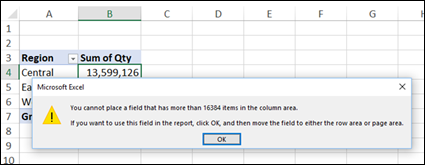
The date grouping feature can help in normal pivot tables too. For example, with a large dataset, Excel shows an error message if I try to put the date field into the Columns area.
“You cannot place a field that has more than 16384 items in the column area. If you want to use this field in the report, click OK, and then move the field to either the row area or page area.”
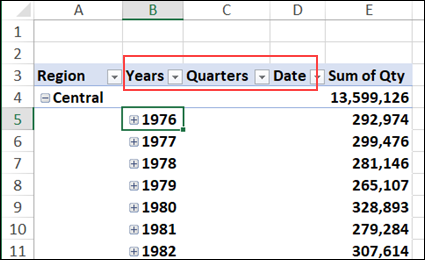
However, Excel allows me to put the Date field into the Rows area, and it automatically groups the dates into Years and Quarters. That saves me the step of having to group the dates manually.
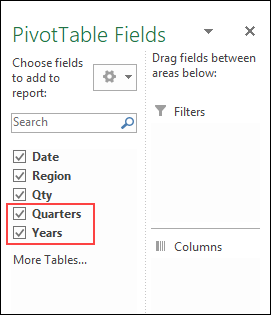
The new fields – Years and Quarters are also automatically added to the PivotTable Fields list.
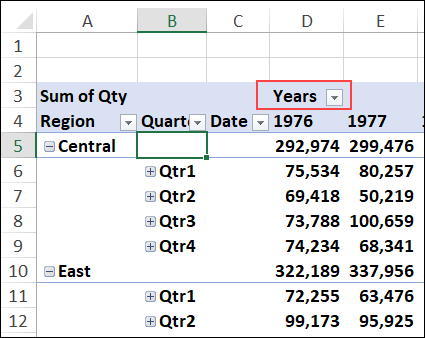
With these grouped fields, I can move Years into the Columns area, and Excel won’t show an error message about the item limit.
Undo Pivot Table Date Grouping
So, the date grouping feature can be a real time saver, if you usually group the dates manually. But, if you don’t like the grouping feature, there are steps you can take to undo it or stop it, depending on which version of Excel you’re using.
For all versions (Excel 2016 and later), you can manually ungroup the dates, with one of these methods:
Keyboard Shortcut
Add the Date field to the pivot table
Immediately press Ctrl + Z, to undo the automatic date grouping
The grouped fields are removed, and the original Date field remains in the pivot table
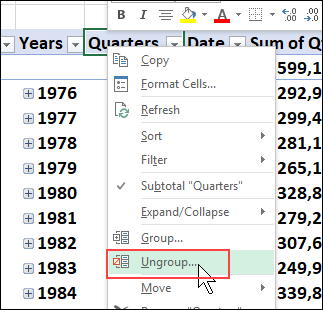
Ungroup Command
Add the Date field to the pivot table
At any time, right-click on any of the date field items or headings
In the right-click menu, click Ungroup
The grouped fields are removed, and the original Date field remains in the pivot table
Video: Pivot Table Date Grouping
Watch this video to see how to group the date field in 4-week periods, and set the starting date. There are written instructions on my Contextures website – Group Pivot Table Dates
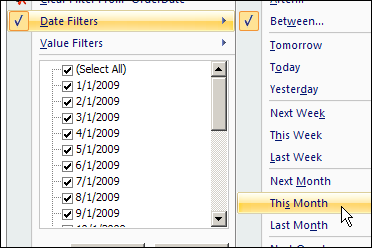
If there’s a date field in your Excel pivot table, you can use it to focus on a specific date, or a selected date range. To filter the dates, you can use the following filter types:
Date checkboxes
Date range entry
Dynamic date range selection
Using Date Checkboxes
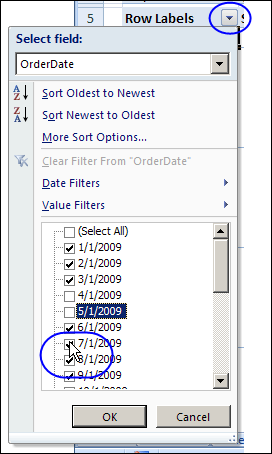
If a date field is in the Row Labels area of the pivot table, do the following to show or hide specific dates.
Click the drop down arrow on the Row Labels heading
Select the Field name from the drop down list of Row Labels fields
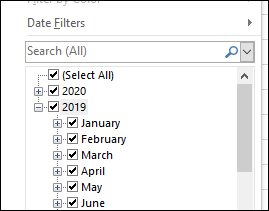
In the list of dates, add check marks to show dates, or remove check marks to hide dates.
Click OK
Clear a Date Filter
To remove a date filter from a pivot table field:
Click the drop down arrow on the Row Labels heading
Select the Field name from the drop down list of Row Labels fields
Click Clear Filter From [date field name]
Filter for a Specific Date Range
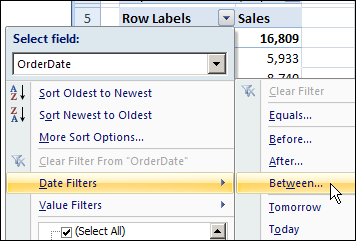
If a date field is in the Row Labels area of the pivot table, do the following to show a specific date range.
Click the drop down arrow on the Row Labels heading
Select the Field name from the drop down list of Row Labels fields
Click Date Filters, then click Between..
.
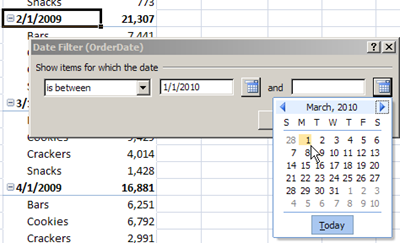
In the Between dialog box, type a start and end date, or select them from the pop up calendars.
Click OK.
Filter for a Dynamic Date Range
A Dynamic Date Range is one that changes automatically, as time moves forward. For example, Tomorrow, which will represent a different date, every day that you open the pivot table file.
If a date field is in the Row Labels area of the pivot table, do the following to show data from the current month, as a dynamic date range.
Click the drop down arrow on the Row Labels heading
Select the Field name from the drop down list of Row Labels fields
Click Date Filters, then click This Month
Date Filters in the Pivot Table Report Filters
Unfortunately, the Date Range filters and Dynamic Date filters aren’t available in the Pivot Table Report Filters area. If you move a date field to the Report Filters area, only the Checkbox filter type is available.
If you move a filtered date field from the Row Labels area to the Report Filters area, any filtering will be discarded, unless the check boxes were used to select specific dates.
Watch the Pivot Table Date Filters Video
To see the steps in action, please watch this short video on Pivot Table Date Filters.
______________
For more information on Pivot Tables, please see the Pivot Table Tutorials on the Contextures Website.