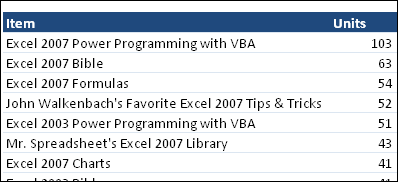
This week, John Walkenbach, aka Mr. Spreadsheet, used a pivot table report to analyze his website’s Amazon sales for 2009. Here’s a screenshot of the results, showing the top sellers, and number of units sold.
John knows a thing or two about Excel, having written over 40 Excel books, so take a look at the full list, and see if there’s something there that will help you.
Excel 2007 Power Programming with VBA
I bought a copy of John’s Excel 2007 Power Programming with VBA a couple of years ago, and highly recommend it. The book is a great reference when you’re learning VBA, or upgrading from an earlier version of Excel.
In its 1104 pages, the book covers pretty much everything you need to know about Excel VBA, and comes with a CD that contains:
- Sample files for the book’s VBA tutorials
- A searchable PDF version of the book
And best of all, there’s a chapter on Pivot Table Programming, that will help you get started with the new pivot table features in Excel 2007. In that chapter, you’ll discover what’s new in Excel 2007 pivot tables, and learn how to:
- create pivot tables with VBA
- create a complex pivot table
- create multiple pivot tables
- use VBA to change a summary table to a worksheet table
_____________