
If you’ve used calculated items and calculated fields in your pivot table, you can automatically create a list of all the formulas.
List the Formulas in Excel 2007
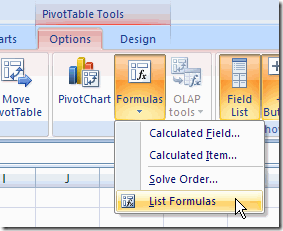
- Select any cell in the pivot table.
- On the Ribbon, under the PivotTable Tools tab, click the Options tab.
- In the Tools group, click Formulas
- Click List Formulas.
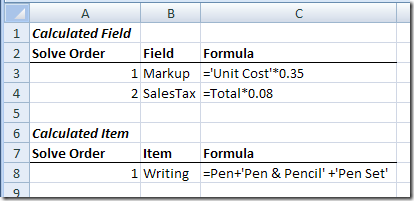
A new sheet is inserted in the workbook, with a list of the calculated fields and a list of the calculated items.
List the Formulas in Excel 2003
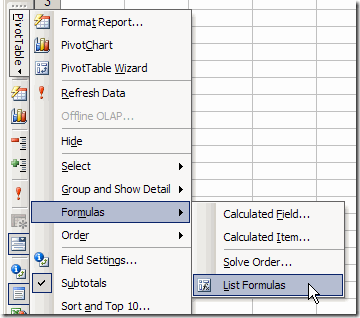
- Select any cell in the pivot table.
- On the Pivot toolbar, click PivotTable.
- Click Formulas, then click List Formulas.
A new sheet is inserted in the workbook, with a list of the calculated fields and calculated items (see the Excel 2007 example above).
___________________________
For more information on pivot tables, see the Pivot Tables on my Contextures web site.
___________________________
Hi,
It’s Very use ful to Employees & Students Bez It’s very nice method & easy to larn.
Thank you so much for providing this …
Regards Jhansi….
Hi,
Do you have any idea on how to add grand total in available field list in pivot.
Grand total value should be dynamic again based on the pivot table page be selection.
Regards
Jega