If there are blank cells in one of the fields in your source data, you might want to show a count of the blank cells in the pivot table.
In this example there’s a Region field in the source data, and some of the records have no region name entered. In the pivot table, you’d like to see a count of how many records are missing a region name.
NOTE: For an updated version of this article, go to Count Blank Entries in Pivot Table
Incorrect Count
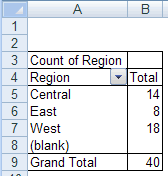
To find the count, you might add the Region field to the pivot table’s row area, and put another copy of the Region field in the data area, as Count of Region.This seems logical, but there’s no count showing for the blank regions.
Video: Count Blank Entries in Pivot Table
[Update] This 3-minute video shows the steps for correctly counting blank items from the source data for a pivot table.
Get the sample Excel file, and written steps, on the Count Blank Cells in Pivot Table page on my Contextures site.
Get Correct Count
A pivot table can’t count the blank cells when you add a field to the data area and use the Count or CountNum summary function. That’s why no count appears beside the (blank) region in the screen shot above.
Instead, put a different field in the data area, and use it for the count.
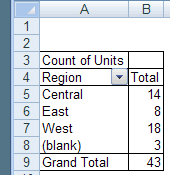
For example, if the Units field will always contain data, add Count of Units to the data area, as shown below.
The count of blank Regions is now calculated, and you can see that three records are missing a region name.