
In Excel 2003, if you protect a worksheet, you’ll see a list of options, with specific items that can be allowed.
You can add a checkmark to “Use PivotTable reports”, so that people will be able to use the existing pivot tables on the worksheet.
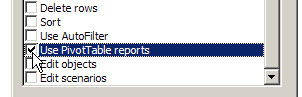
However, once the sheet is protected, you can’t create a new pivot table. Also, you won’t be able to refresh a pivot table on the worksheet, because that feature is disabled on a protected sheet. On the PivotTable toolbar, you can see that the Refresh button, and other features, are disabled.
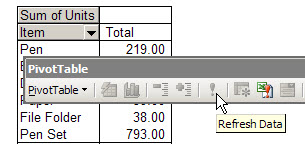
Refresh the Pivot Table on a Protected Sheet
To refresh the pivot table on a protected worksheet,
- temporarily unprotect the worksheet,
- refresh the pivot table,
- protect the sheet.
You can do this manually, or record a macro, then run that macro to refresh the pivot table.
More Protection Tips
There are more pivot table protection tips on my Contextures website.
___________________________
Typically one wants to enable clients to enter data in specific areas and then be able to evaluate the results, through refresh. Is there absolutely no way around this without using VBA?
Giel, you could leave the pivot table sheet unprotected, so it can be refreshed. Protect the data entry sheet, leaving the cells unlocked where the users can make changes.
Thx. The option I was looking for to have pivot table and data entry in the same sheet. That is not possible so perhaps I should use ‘view’ “new window” to allow for data entry and evaluation of results at the same time. giel
I am using a macro to refresh a Pivot Table and I am getting an error. It stops running at this point
” ActiveSheet.PivotTables(“PivotTable5″).RefreshTable”
I am working with Excel 2010
@Saswati, your pivot table probably has a name other than “PivotTable5”
If there is only one pivot table on the sheet, change the code to use the index number, instead of the name:
ActiveSheet.PivotTables(1).RefreshTable
@Debra, but it worked fine on Excel 2003
@Saswati, was the code in the same file, for the same worksheet? It should work fine in Excel 2007 too, but try using the index number, instead of the pivot table name, in the code.
@Deb
Still giving the same error at the same place, here is the whole code
Sub RefreashCSQF()
‘
‘ RefreashCSQF Macro
‘ refreash Qualified Change Sheet pivot table
‘
‘
Application.Goto Reference:=”hyperlink”
Range(“B1″).Select
Selection.Hyperlinks(1).Follow NewWindow:=False, AddHistory:=True
Application.Goto Reference:=”Date”
Selection.Copy
Windows(“SAM.xls”).Activate
Application.Goto Reference:=”Date”
Selection.PasteSpecial Paste:=xlValues, Operation:=xlNone, SkipBlanks:= _
False, Transpose:=False
Application.Goto Reference:=”CSQF”
Application.CutCopyMode = False
ActiveSheet.PivotTables(1).RefreshTable
Range(“A1”).Select
Windows(“Account Summary.XLS”).Activate
ActiveWorkbook.Close
End Sub
Hi,
I’m using the below mentioned macro to refresh all the pivot tables in a worksheet. The macro is running successfully in unprotected sheet, but I need to run it in protected sheet by using a shortcut key. Please suggest
Sub AllWorksheetPivots()
Dim pt As PivotTable
For Each pt In ActiveSheet.PivotTables
pt.RefreshTable
Next pt
End Sub
Ms. Debra;
You are the Pivot Table Queen!!!!!!, great material, I love your work and kindness that you put in each answer of yours.
Just used this code for refresing my PT
Private Sub Worksheet_Activate()
Dim pt As PivotTable
Me.Protect Password:=”Secret”, UserInterfaceOnly:=True
For Each pt In Me.PivotTables
pt.RefreshTable
Next pt
End Sub
It refreshed my PT succesfully, but I cannot use the expand and collapse buttons, anylonger; any assistance to fix this will be appriacated.