
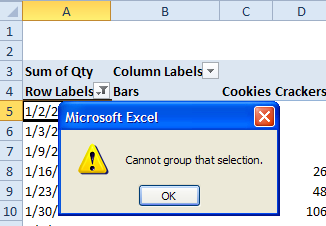
In Excel 2007, you added a date field to the pivot table’s Row area, and you want to group the dates by year. However, you get an error message, “Cannot group that selection”, when you try to group the dates.
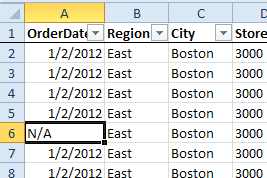
This error occurs if there are cells in the source data that contain text, instead of dates. For example, you may have entered text such as N/A, if a date was not available when the data was being entered.
How to Fix the Problem
To correct the problem, do the following:
- In rows contain text, such as N/A, delete the text, and leave the cell blank, or replace the text with a valid date.
- Refresh the pivot table, and try to group the dates.
- If you’re still unable to group the dates, remove the date field from the pivot table layout, refresh the pivot table, then add the date field to the pivot table again.
Note: In earlier versions of Excel, blank cells will also cause this error message. You can fill in actual dates, or use dummy dates, such as 2/2/2099, in the source data. Do not leave the cells blank if you want to group the dates.
More Pivot Table Grouping
Fix Pivot Table Problem – Cannot Group That Selection
Stop Pivot Table Date Grouping
Set Start Date For Pivot Table Grouping
Grouping Shows Items Before and After Date Range
__________________
Hi there,
I have had the above problem with dates but it was due to my source data using a dynamic named range. If I create the Pivot Table via a fixed range, I do not get an error when grouping dates.
I really would like to use a dynamic named range as my data increases.
Anyone got any ideas that might help?
Thanks
Sally, your dynamic range might be including a blank row at the end. Perhaps you need to subtract 1 from the row count in the OFFSET function.