
Last year, I posted Excel VBA code for removing a calculated field from a pivot table.
The code works well if there is only one pivot table based on that pivot cache. However, a couple of comments mentioned that there were problems if multiple pivot tables shared the pivot cache.
Here is a revised version of the code, that checks for other pivot tables using the same pivot cache. If others are found, the macro is cancelled, and a message appears, listing the pivot tables.
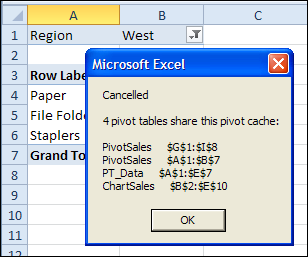
Remove Calculated Fields for Non-Shared Pivot Cache
If other pivot tables in the workbook share the same cache, the macro is cancelled. A message lists those pivot tables.
Sub RemoveCalculatedFieldsNotShared()
Dim ws As Worksheet
Dim ptA As PivotTable
Dim pt As PivotTable
Dim pf As PivotField
Dim pfNew As PivotField
Dim strSource As String
Dim strFormula As String
Dim iPC As Long
Dim lCache As Long
Dim strPC As String


Set ptA = ActiveSheet.PivotTables(1)
iPC = ptA.PivotCache.Index

For Each ws In ActiveWorkbook.Worksheets
    For Each pt In ws.PivotTables
        If pt.PivotCache.Index = iPC Then
            lCache = lCache + 1
            strPC = strPC & ws.Name & "     " _
                & pt.TableRange2.Address _
                & vbCrLf
        End If
    Next pt
Next ws

If lCache > 1 Then
    MsgBox "Cancelled" _
        & vbCrLf & vbCrLf _
        & lCache & " pivot tables share this pivot cache: " _
        & vbCrLf & vbCrLf _
        & strPC
    GoTo exitHandler
Else
    For Each pf In ptA.CalculatedFields
        strSource = pf.SourceName
        strFormula = pf.Formula
        pf.Delete
        Set pfNew = ptA.CalculatedFields.Add(strSource, strFormula)
    Next pf
End If

exitHandler:
    Exit Sub

End Sub
_______________
Are pivot caches shared across pivot tables by default? I have multiple pivots off a same range of data, which changes the # of rows daily. I used VBA to change the data source for the pivots, but the code works only if there is a single pivot table in the entire workbook. Any ideas why this is, and how to overcome this limitation? I use MS Excel 2007
Hi Debra,
Is there a way to Remove Calculated Fields for Shared Pivot Cache,
I am Using the following code to refresh the data fields in the my workbook, but i have problems with calculated fields, only one pivot table in my workbook is getting updated. can you let me know how to deal with this?
Private Sub ComboBox1_Change()
Dim ws As Worksheet
Dim pt As PivotTable
Dim pi As PivotItem
Dim pf As PivotField
Dim strField As String
Dim pfNew As PivotField
Dim strSource As String
Dim strFormula As String
strField = Range(“c35”)
On Error Resume Next
Application.EnableEvents = False
Application.ScreenUpdating = False
For Each ws In ThisWorkbook.Worksheets
For Each pt In ws.PivotTables
For Each pf In pt.CalculatedFields
strSource = pf.SourceName
strFormula = pf.Formula
pf.Delete
Set pfNew = pt.CalculatedFields.Add(strSource, strFormula)
Next pf
For Each pf In pt.DataFields
pf.Orientation = xlHidden
Next pf
With pt.PivotFields(strField)
.Orientation = xlDataField
.Function = xlSum
End With
Next pt
Next ws
Application.EnableEvents = True
Application.ScreenUpdating = True
End Sub