
Beginning Pivot Tables in Excel 2007


Your worksheet formulas can create traffic-light charts, highlight chart elements, assign number formats, and more.


Categories


Learn how to create Excel dashboards.

Changing the Default PivotTable Style in Excel 2007

When you create a pivot table in Excel 2007, a PivotTable Style is automatically applied. You always select a different PivotTable Style, so you'd like to change the default PivotTable Style, to save time when you create new pivot tables.
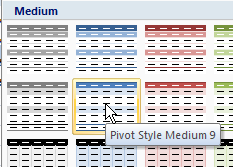
Follow these steps to change the default PivotTable Style:

  1. Select a cell in the pivot table.
  2. On the Ribbon, under the PivotTable Tools tab, click the Design tab.
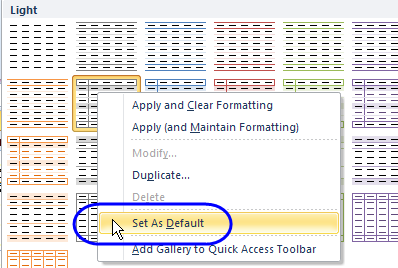
  3. In the PivotTable Style gallery, right-click on the style that you want to set as the default.
  4. In the context menu, click on Set As Default.
___________________________

For more information on pivot tables, see the Pivot Table Topics on my Contextures web site.

Related Posts Plugin for WordPress, Blogger...

5 comments to Changing the Default PivotTable Style in Excel 2007

  • Carim

    Hi Debra,
    In addition to the Style gallery,
    is there a simple way to set all the various parameters of the pivot table display options ?
    Thanks for your help
    Carim

  • Debra Dalgleish

    Hi Carim, not that I know of. You can use the Style gallery, or create a macro to format the pivot table.
    Debra

  • Hi Debra,

    I have been trying to set a default PivotTable design in Excel 2007.

    I have tried the steps above but it does not seem to work. Any idea what I may be doing wrong?

    Alan

  • @Alan, if the file was originally saved with pivot tables, in Excel 2003 format, then converted to Excel 2007, the classic Excel layout persists, and override the 2007 pivot styles.

    If that’s the problem, try copying the source data to a new workbook, and create the pivot tables there.

  • That may well be it. Ill check it out.

    Thanks Debra.

Leave a Reply


You can use these HTML tags

<a href="" title=""> <abbr title=""> <acronym title=""> <b> <blockquote cite=""> <cite> <code> <del datetime=""> <em> <i> <q cite=""> <strike> <strong>